



Netgear Orbi 770 review: the Wi-Fi 7 mesh system that finally makes sense
Netgear has a long history of charging premium prices for premium hardware. The Orbi 770 keeps the performance and cuts the price, and it shows what the brand can do when it tries
Netgear’s Orbi range has always sat at the expensive end of the mesh Wi-Fi market. For a long time, that was fine: the hardware justified the cost, and buyers who needed whole-home coverage at the high end of what Wi-Fi technology could deliver had relatively few credible alternatives. Then rivals caught up, prices across the category fell, and Netgear’s pricing started to look less like a premium and more like a habit.
The Orbi 770 feels like a course correction. It’s a tri-band Wi-Fi 7 mesh system with 11Gbps of total throughput, genuine whole-home reach, and pricing that finally puts it in the same conversation as serious competition from TP-Link and Linksys. It’s not cheap, and a couple of Netgear’s less endearing tendencies survive intact, but as a package the Orbi 770 represents the most compelling value the brand has offered in this category in years.
I tested the three-unit configuration, the router plus two satellites, across a multi-storey home with thick internal walls and a notoriously awkward rear extension that has historically defeated most single-router setups. The short version: it handles all of it, maintains consistent speeds throughout, and takes about fifteen minutes to set up from unboxing. If you’ve been waiting for Wi-Fi 7 mesh to become affordable without requiring compromise on coverage or performance, the Orbi 770 is the answer.
Pros
- Excellent Wi-Fi 7 performance across a wide coverage area
- Clean, simple setup via the Orbi app
- MLO and full tri-band Wi-Fi 7 feature support
- Multiple 2.5Gb Ethernet ports on both the router and satellites
Cons
- Parental controls beyond basic pause require a paid subscription
- No USB ports on the router or satellites
- App is functional but thin on advanced controls for power users
Quick specs
| Price | From £449.99 (two-pack); £799.99 (three-pack) |
| Wi-Fi standard | Tri-band Wi-Fi 7 (2.4GHz / 5GHz / 6GHz) |
| Max speed | 10.8Gbps (marketed as 11Gbps) |
| Router ports | 1x 2.5Gb Ethernet WAN, 3x 2.5Gb Ethernet LAN |
| Satellite ports | 2x 2.5Gb Ethernet LAN per unit |
| Processor | Quad-core 1.5GHz |
| RAM / Storage | 2GB RAM / 4GB flash |
| Coverage | Up to 5,500 sq ft (two-pack); up to 8,000 sq ft (three-pack) |
| Dimensions | 251 x 134 x 100mm, 0.9kg per unit |
What does the Orbi 770 cost, and is it worth it?
The Orbi 770 is available in two configurations in the UK. The two-pack, one router and one satellite, costs £319.99 and covers up to 5,500 sq ft, which is sufficient for most three- to four-bedroom homes. The three-pack, router plus two satellites, costs £759.99 and extends that coverage to 8,000 sq ft. Both are available now directly from Netgear and major UK retailers.
For context, the Orbi 970, Netgear’s flagship mesh system, starts at over £2,000 for a three-unit configuration. The Orbi 770 occupies a completely different price bracket while retaining the same fundamental Wi-Fi 7 specification. That gap is the whole point of the product, and Netgear has executed it more cleanly than the brand’s previous attempts at accessible pricing suggested it would.
Against direct competitors, the Orbi 770 holds up well. The Linksys Velop Pro 7 offers a comparable Wi-Fi 7 spec at a similar price and is worth cross-shopping. The TP-Link Deco BE85 comes in lower but trades some performance headroom to get there. For a full three-unit Wi-Fi 7 mesh system where every satellite carries its own 2.5Gb Ethernet ports, £759.99 is a fair price.
Watch out for the subscription costs
The recurring cost caveat requires upfront transparency. The Orbi app is free, but meaningful parental controls sit behind Netgear’s Smart Parental Controls subscription at £49.99 per year, and the Armor security suite costs £84.99 annually after a 30-day free trial. Both are optional. But rival systems from TP-Link and Amazon include equivalent features in the purchase price, which means comparing the Orbi 770 purely on hardware cost can be misleading if these features are part of your requirements. Factor in the subscription cost that applies to your household before making a final decision.
Looks like an Orbi, built to a budget
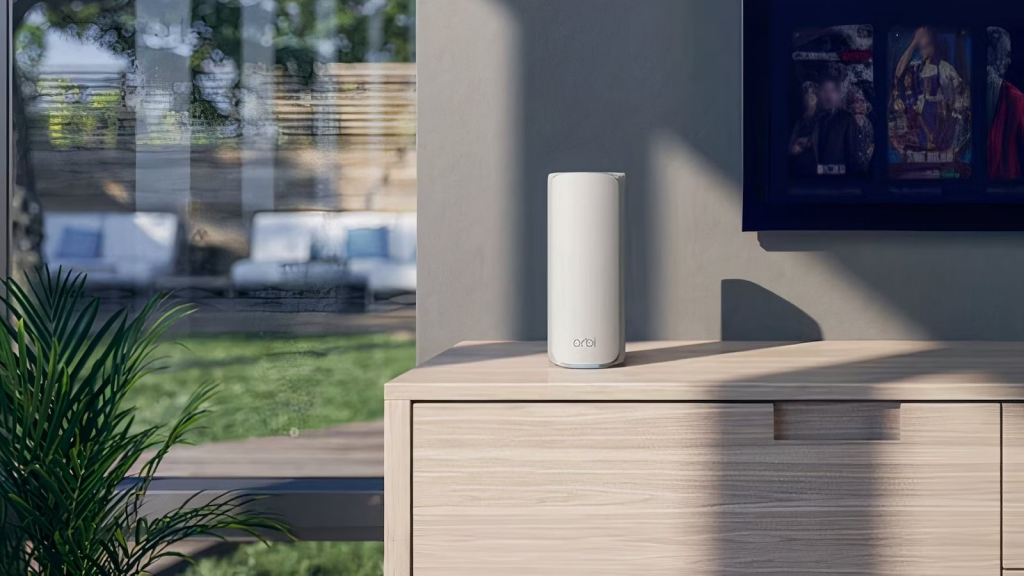
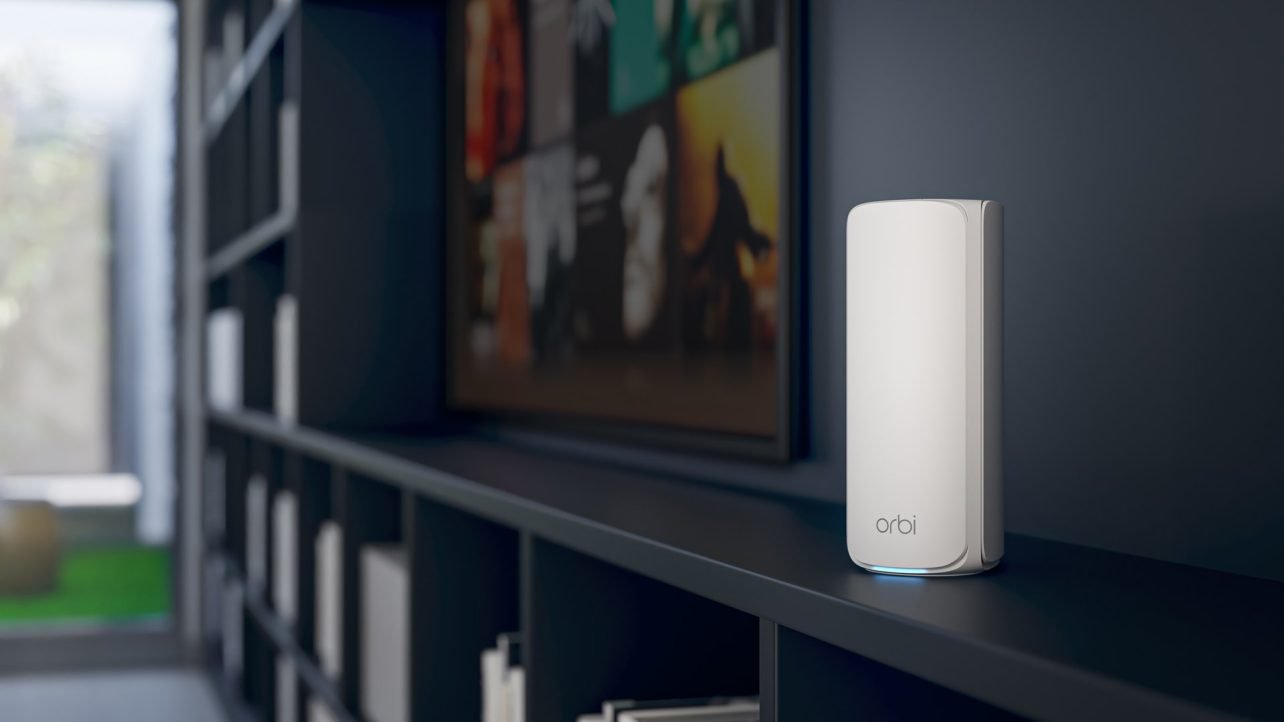
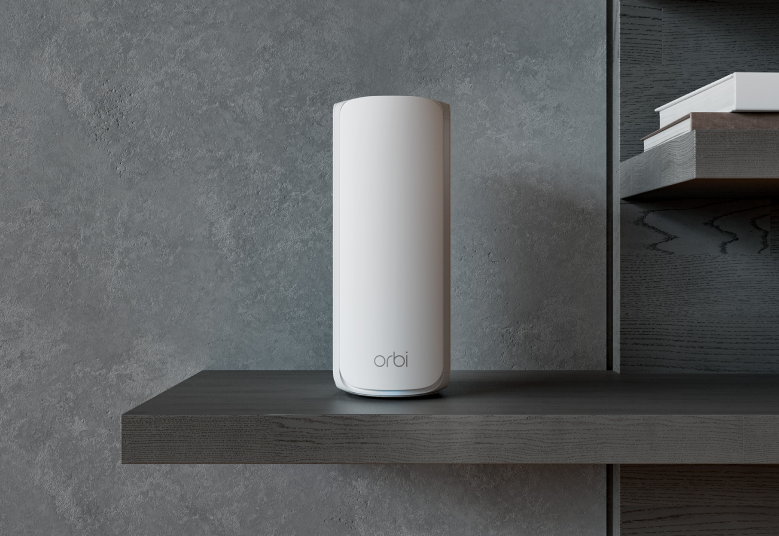
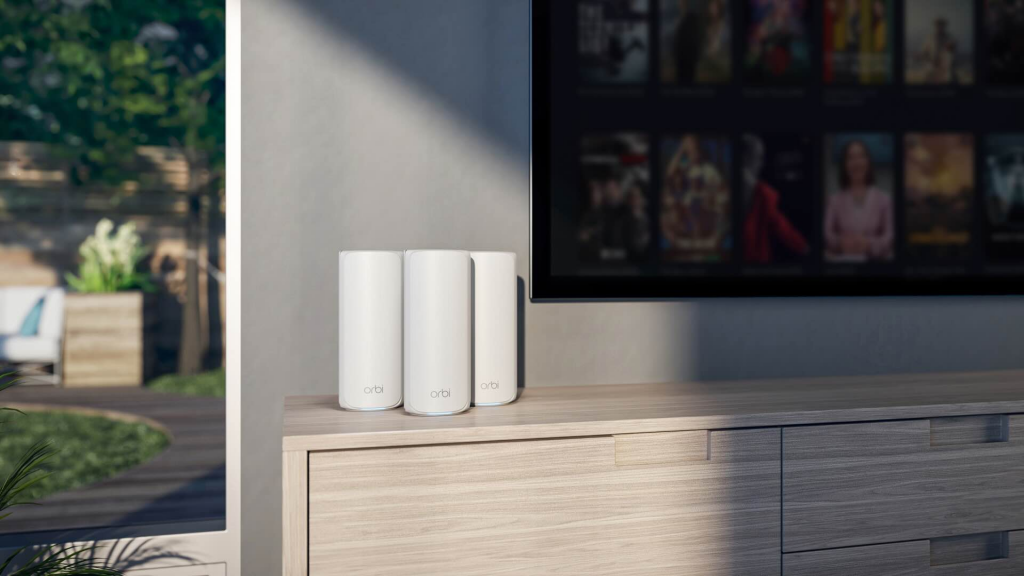
The Orbi 770 follows the same visual language as the rest of the Orbi range: a tall, upright unit with a rounded rectangular form that prioritises transmitting the Wi-Fi signal in a full 360-degree arc. The white plastic finish is clean and neutral, designed to sit on a shelf or side table without demanding attention. In terms of aesthetics, it reads as domestic rather than technical, which suits a product that most households will want to place in a living room or hallway rather than tucked away in a utility cupboard.
The router and satellites are visually near-identical, with the primary router identified by a label on the front. Placing them side by side you’d struggle to spot the difference at a glance, which is a sensible uniformity: it means the satellites don’t look like obvious add-ons when positioned around the home. The practical distinctions are all on the rear panel.
Ethernet ports everywhere, USB nowhere
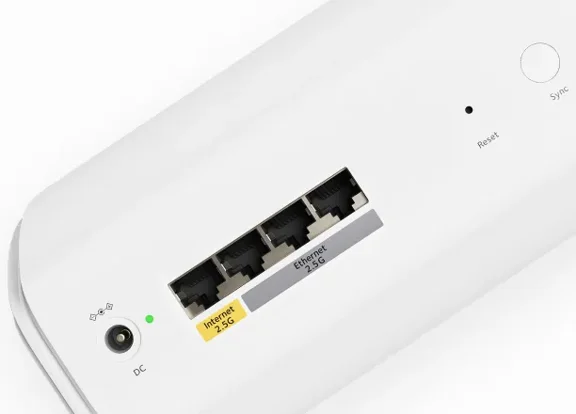
|The router carries one 2.5Gb Ethernet WAN port for connecting to your existing broadband modem or router, plus three additional 2.5Gb LAN ports for wired devices. Each satellite has two 2.5Gb LAN ports. The total of seven 2.5Gb Ethernet connections across the three-unit system is generous at this price tier, and it has real practical value. In a home where a NAS drive lives in one room, a games console in another and a smart TV or streaming box in a third, each can be wired to the nearest satellite and run at 2.5Gb rather than being limited to gigabit or relying on Wi-Fi entirely.
The absence of USB is a notable omission. There are no USB ports on the router or either satellite, which means the Orbi 770 can’t host shared network storage or a printer directly. The Orbi 970 supports USB connectivity, and some competing mesh systems at this price tier include at least one port on the primary router. For most buyers this won’t be a problem, but if your current router handles USB-attached storage and you were planning to carry that forward, the Orbi 770 requires a different solution.
Build quality is honest rather than impressive. The plastic casing is lighter than on Netgear’s higher-end hardware, and handling the units you notice the difference. They feel more like mid-range consumer electronics than the denser, more substantial feel of the Orbi 970. That’s a function of cost reduction and shouldn’t affect long-term reliability, but it does mean the units don’t instil the same confidence when you first pick them up. On a flat surface they’re perfectly stable. The main practical implication is that they’re not well-suited to environments where they could be knocked or dropped, so households with young children should position them accordingly.
The status LEDs on each unit are subtle and informative without being distracting. During setup they indicate each stage of the process clearly. In everyday use a small ring around the base glows white when everything is connected correctly, shifting colour to indicate issues. It can be switched off entirely via the app if you find any ambient light intrusive at night, which is a small quality-of-life detail that more products should include.
Setup takes fifteen minutes. The app takes some getting used to
Setup is where the Orbi 770 makes its most immediate positive impression. Unboxing to a working three-unit mesh network takes around fifteen minutes, and the process is genuinely straightforward. The Orbi app prompts you to connect the primary router to your modem, scan the QR code printed on the unit to join the new network, and choose whether to keep the default credentials or set your own. Once the router is live, the app guides you through placing and connecting the satellites, automatically linking all three units into a single mesh and confirming coverage before you’re done.
There’s no need to access a web interface or configure anything manually. For a product category that has historically asked a lot of buyers during installation, the Orbi 770’s setup process removes almost all of the friction. The only thing that requires patience is the initial boot sequence: each unit takes a few minutes to fully initialise before it’s ready to configure, so the process isn’t instant, but it’s passive waiting rather than active work.
Once running, the Orbi 770 operates as a tri-band system across 2.4GHz, 5GHz and 6GHz simultaneously, with a combined throughput of 10.8Gbps. The app defaults to a single merged network, so your devices connect to whichever band and node delivers the best performance at their current location without any manual intervention. This is the right default for most households. For those who want more control, the option to manage bands separately is available, though you have to go looking for it.
Three networks in one: main, guest and IoT
Beyond the main network, the Orbi 770 supports a guest network and a dedicated IoT network. The guest network is standard: a separate SSID with limited access to your primary network, suitable for visitors. The IoT network is more interesting. It carves off the 2.4GHz band specifically for smart home devices such as bulbs, cameras, thermostats and sensors, keeping that traffic segmented from your main devices. It’s a genuinely useful security measure. Smart home devices have a patchy track record on security updates, and keeping them on a separate network limits the exposure if one is compromised. Having this as a built-in option in the standard app, rather than requiring manual VLAN configuration, makes it accessible to non-technical users who would otherwise never set it up.
What MLO actually does for you
The Orbi 770 supports MLO (multi-link operation), one of the headline features of the Wi-Fi 7 standard. MLO allows devices to transmit and receive data across multiple frequency bands simultaneously rather than picking one and staying on it. In practice, this means a Wi-Fi 7 device can use both the 5GHz and 6GHz bands at the same time, combining their throughput and improving resilience: if one band becomes congested or experiences interference, traffic shifts automatically to the other without dropping the connection. For video calls, streaming and online gaming, where a momentary drop in signal quality is immediately noticeable, MLO provides a meaningful improvement over single-band operation. The Orbi 770 supports it fully; your devices also need to support Wi-Fi 7 to benefit.
Where the app loses ground to some competitors is in advanced network management. The controls available cover the needs of the majority of home users comfortably, but anyone accustomed to detailed traffic monitoring, per-device bandwidth allocation, advanced quality-of-service rules or granular firewall configuration will find the interface limited. This is partly by design: Netgear has structured the product so that advanced features come via subscription rather than the base app. The approach works if you’re willing to pay for what you need, but it creates a gap between what the Orbi 770 can do and what it exposes by default that some competing products don’t have.
Parental controls cost extra, and that still stings
Parental controls are the most obvious instance of this. The free tier allows you to pause internet access for individual devices. That’s a useful emergency lever but a minimal parental tool. Scheduling access hours, filtering content categories, viewing activity logs and setting per-device controls all require the Smart Parental Controls subscription at £49.99 per year. That’s not an unreasonable fee, but it’s an additional annual cost that TP-Link’s HomeShield, built into the Deco range, provides at its basic tier without charge. For families with children where active internet management matters, the subscription cost should be part of the purchase decision.
Fast, consistent and genuinely whole-home
The Orbi 770 performs at the level its specification implies. Combined throughput of 10.8Gbps across three bands is more than enough headroom for any current domestic broadband connection in the UK, and the practical question isn’t whether it can match your ISP’s speeds, it can, but whether it maintains those speeds consistently across the coverage area. It does.
In testing, the primary router delivered full available broadband speeds at close range without issue. More significantly, the satellites sustained those speeds at distance and through obstruction. A rear ground-floor extension separated from the main building by an older wall and a different floor level, the kind of layout that causes consistent dead-zone problems with single-router setups and challenged some two-unit mesh systems in testing, maintained consistent speeds throughout. Upper floor rooms, including one at the opposite end of the building from the nearest satellite, performed comparably to rooms adjacent to the router. There were no dead zones, no significant drop in speed between rooms, and no disconnections during an extended test period.
Why the dedicated backhaul matters
The dedicated backhaul is part of why this works. In a tri-band mesh system, the third band, here the 6GHz channel, is reserved for communication between the router and satellites rather than servicing client devices. This means that the data clients send and receive doesn’t compete with the traffic flowing between nodes, which is the failure mode that makes cheaper two-band mesh systems inconsistent at range. The Orbi 770’s performance is as good at the edges of the coverage area as it is at the centre, and the backhaul architecture is why.
2.5Gb wired on every node, not just the router
The 2.5Gb Ethernet ports merit a separate mention because their value is easy to understate in a spec sheet. Most mesh systems at this price offer standard gigabit Ethernet at best, and many offer it only on the primary router. The Orbi 770 provides 2.5Gb ports on every unit in the system. For wired devices, that means the ceiling for wired throughput is 2.5Gbps rather than 1Gbps, which matters as NAS drives, games consoles and media servers increasingly support faster wired connections. It also means the system is better positioned for higher-speed broadband connections: as full-fibre services delivering speeds above 1Gbps become more common in the UK, a router limited to a 1Gb WAN port becomes a bottleneck. The Orbi 770 avoids that problem.
For mixed device environments, which is what most households actually have, the Orbi 770 manages the range without any manual configuration. Older devices on Wi-Fi 5 and Wi-Fi 6 connect to the 2.4GHz and 5GHz bands and receive the speeds they’re capable of. Newer Wi-Fi 7 devices connect to the 6GHz band and can use MLO where supported. The system handles band selection and steering automatically. You don’t need to manage which device connects to which band, and you don’t need to replace your older hardware to use the system: the Orbi 770 accommodates everything you already own while being ready for what comes next.
Latency across the mesh was consistently low during testing. Online gaming and video calls, the two use cases most sensitive to latency spikes, performed without noticeable issues anywhere in the coverage area. The IoT network, where it was active, ran independently without any measurable impact on primary network performance.
Verdict
The Netgear Orbi 770 is the clearest signal yet that the brand has understood where the market has moved. The performance is strong, the coverage across a three-unit configuration is genuinely whole-home in a way that many competitors still only approximate, and the setup process removes almost every barrier that has historically made mesh Wi-Fi feel complicated. Priced at £449.99 for two units or £759.99 for three, it sits in a bracket that finally reflects its actual competitive position rather than a brand premium Netgear hasn’t fully earned in this tier for some time.
The things that hold it back are consistent with Netgear’s broader product strategy rather than specific failures of this hardware. Parental controls locked behind a subscription is a recurring complaint, and one that carries more weight now that direct alternatives include comparable features for free. The app, while clean and easy to navigate, gives advanced users less than they might want without that subscription. And the lack of USB, while not unusual at this price, is a reduction from what more expensive Orbi models offer.
What you’re left with is a Wi-Fi 7 mesh system that covers large homes thoroughly, handles mixed device environments without manual management, provides more wired Ethernet capacity than most competitors at the price, and runs on hardware that, while not the most premium in feel, gets the job done reliably. For most buyers, those are the right priorities. The Orbi 770 is an easy recommendation. Buy it.
Also consider
TP-Link Deco BE85 (from £349.99 for two-pack): The strongest budget challenger in Wi-Fi 7 mesh. Peak throughput is slightly below the Orbi 770, but TP-Link’s HomeShield includes parental controls and security features at its basic tier without an annual charge. If the Netgear subscription cost is a dealbreaker, start here.
Linksys Velop Pro 7 (from £249.99 for two-pack): Comparable Wi-Fi 7 specification to the Orbi 770 with a slightly more detailed base app, including better QoS controls without requiring a subscription. Worth shortlisting if granular network management matters and you’d rather not pay for it separately.
Netgear Orbi 970 (from £999.99 for two-pack): The step-up Orbi for buyers who need more from wired connectivity: the Orbi 970 adds 10Gb Ethernet ports on the router, which the 770 doesn’t offer. Performance ceiling is higher and build quality is noticeably more premium. Only worth the significant price difference if your broadband connection or wired devices can actually use the additional throughput.