



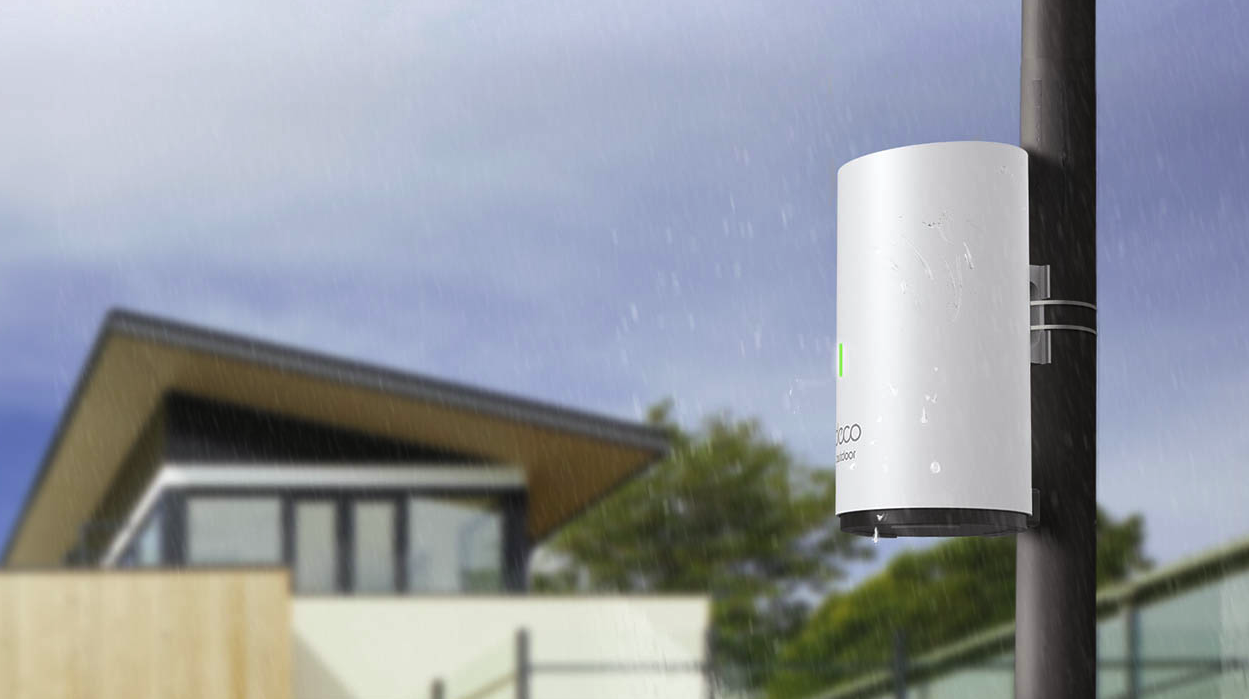
TP-Link Deco X50-Outdoor review: finally, WiFi that doesn’t give up at the patio doors
A weatherproof mesh add-on that takes your existing Deco network into the garden without slowing it down
Most home WiFi problems have nothing to do with your router and everything to do with your walls. Step out onto the patio, into the garden office, or down to the shed, and even a decent router can leave you with a single flickering bar. TP-Link’s answer is to take the guts of its popular Deco X50 mesh unit and seal them inside a genuinely weatherproof housing, creating a satellite node built to live outside permanently rather than get dragged out for the occasional barbecue. We spent time setting it up from scratch, testing it as both a main hub and an add-on to an existing mesh, and pushing real files across it to see whether the extra housing costs you any speed.
Verdict
The Deco X50-Outdoor solves a genuinely annoying problem: the moment you step outside, your WiFi usually falls off a cliff. This is a weatherproofed satellite unit that bolts onto an existing Deco mesh system and carries WiFi 6 speeds out into the garden, shed or driveway, without needing a separate network name or any real technical know-how to set up. It’s not a standalone router, and it only works if you’re already in the Deco ecosystem, but for anyone who already owns Deco kit and wants signal by the pool rather than just in the kitchen, this is a sensible, well-priced way to get it.
Pros
- Genuinely weatherproof, rated IP65 for dust and rain, and built to handle temperatures from -30C to 60C
- Works with the existing Deco app and mesh network, so there’s no separate SSID to manage
- Supports Power over Ethernet, so a single cable can carry both data and power to an awkward spot
- Setup takes minutes even for total beginners, whether you’re using it as the main hub or adding it to a system you already own
Cons
- Only two Ethernet ports rather than the three on the standard indoor Deco X50
- Requires an existing Deco mesh system to be genuinely useful; it isn’t a great value standalone router
- No WiFi 7 support, though most home devices don’t use it yet anyway
- Taller housing than the indoor unit, so it’s more visible if you were hoping for something discreet
Quick specs
| WiFi standard | WiFi 6 (802.11ax), dual-band 2.4GHz and 5GHz |
| Speed | Up to 574Mbps on 2.4GHz, up to 2402Mbps on 5GHz |
| Ethernet ports | 2x Gigabit, with PoE support |
| Power | AC adapter or Power over Ethernet |
| Dimensions | 110 x 121.3 x 215.5mm |
| Weatherproofing | IP65 rated, operates from -30C to 60C |
| Mounting | Table, wall or pole |
| App | TP-Link Deco app, works with Alexa |
Design and build

Take the standard Deco X50 and give it a proper weatherproof housing, and you’ve essentially got the Outdoor version. The core hardware is the same, but the casing is noticeably taller, largely because TP-Link has had to fit the power supply unit inside the body rather than using an external plug. It’s still finished in the same matte white as the rest of the Deco range, so it doesn’t look out of place if you’re already running Deco kit indoors, and it’s happy to sit on a table, get wall-mounted, or attach to a pole depending on where you need coverage.
The connections live on the base rather than round the back, sealed away from rain and dirt. You get two Gigabit Ethernet ports that support Power over Ethernet, plus an AC power input and a reset button. That’s one fewer Ethernet port than the standard indoor Deco X50 offers, which is worth knowing if you were planning to use this unit as your main hub rather than purely as a garden extension. If you only ever intend to use it outdoors as an add-on, that missing port is unlikely to matter.
It’s worth being clear about what you’re actually buying here versus the standard indoor Deco X50. The core radios, the WiFi 6 chipset and the mesh software are identical, so you’re not sacrificing performance for weatherproofing, which isn’t always true of outdoor-rated tech. What you are trading is a slightly bulkier unit and one less port, in exchange for a housing that will happily sit through a British winter without a second thought. For anyone who’s tried running an indoor mesh node in a garage or a covered porch and watched it slowly give up over a few damp months, that trade feels like an easy one to make.
Setup
This is genuinely one of the more painless mesh setups we’ve come across, even for people who’ve never touched a Deco system before. Power it via the AC adapter, and if it’s going to be your main unit, you’ll also need to run a LAN cable to it. If it’s joining an existing mesh, the power cable on its own is enough. Go the PoE route instead and you only need a single Ethernet cable, since that carries both data and power together, which is genuinely useful if you’re mounting the unit somewhere without an easy plug socket nearby.
Once it’s powered up, the Deco app spots it automatically and walks you through adding it to your network in a couple of minutes. Expanding further is just as simple: plug in another Deco unit and it joins the mesh on its own.
That simplicity is the real selling point for anyone who isn’t a networking enthusiast. There’s no separate app to learn, no manual channel selection, and no need to give the outdoor unit its own network name that you then have to remember to switch to when you walk into the garden. It just becomes part of the WiFi you already have, which is exactly how mesh systems are supposed to work but don’t always manage in practice.
Performance

In everyday use, the Deco X50-Outdoor holds up well. Large file transfers of 3 to 4GB moved across the network quickly, and the internet speed we were able to pull through it kept pace with our line’s rated speed without any obvious bottleneck. Latency was low too, which matters if you’re gaming on a console or PC set up somewhere the main router doesn’t comfortably reach.
TP-Link’s AI-driven mesh steering is doing a lot of the work here. With multiple Deco units on the network, your devices get automatically pointed towards whichever module has the strongest signal, rather than sticking stubbornly to the one they first connected to. Combined with MU-MIMO and OFDMA support for handling several devices at once, it’s a genuinely capable setup for anyone with a garden office, an outdoor camera, or just a patio where the WiFi used to give up.
Coverage is rated at around 230 square metres per unit, which is a reasonable spread for one outdoor node, though as with any mesh system, thick walls, fencing and distance will all eat into that figure in practice. If you’ve got a larger garden or an outbuilding some distance from the house, you may want to budget for a second Outdoor unit rather than expecting one to cover everything.
Where the Deco X50-Outdoor is honest with you is in how it presents its limits. This isn’t the fastest mesh satellite on the market, and TP-Link doesn’t pretend otherwise; it’s a WiFi 6 unit rather than the newer, pricier WiFi 7 hardware now appearing elsewhere in the Deco range. For most households streaming, video calling or gaming outdoors, that distinction won’t be noticeable day to day. It only really starts to matter if you’re trying to run several bandwidth-heavy devices outside at once, in which case the newer WiFi 7 outdoor unit further down this page is worth a look instead.
Who it’s for
This is squarely aimed at people who already own a Deco mesh system and have simply given up on WiFi reaching the garden. If you work from a garden office a few times a week, run outdoor security cameras that need a reliable connection, or just want to stream music by the pool without the connection dropping every time you walk past a fence panel, this solves that problem cleanly.
It’s a less obvious choice if you don’t already own Deco kit. Buying this unit on its own as your only router would be an odd decision, since you’d be paying a premium for weatherproofing you don’t need indoors, and missing an Ethernet port you might want. In that case, you’re better off starting with a standard Deco X50 kit and treating outdoor coverage as a later addition once the rest of the house is sorted.
Conclusion
The Deco X50-Outdoor does one job and does it well: it takes a WiFi 6 mesh network that already works indoors and pushes it out into the garden without complicating the setup or slowing things down. The missing Ethernet port and the reliance on an existing Deco system are minor caveats rather than dealbreakers, and the weatherproofing genuinely feels built for year-round outdoor use rather than a fair-weather compromise.
Buy it if you already have a Deco mesh system and want reliable, fast WiFi outdoors without extra hassle. Skip it if you’re starting a network from scratch, since you’re better off buying a full Deco mesh kit first and treating this as the add-on it’s designed to be.
Common questions
Does the Deco X50-Outdoor work as a standalone router? It can act as the main hub of a Deco network, but it’s designed and priced as part of a wider mesh system, so most people will get better value setting it up as an add-on to existing Deco hardware.
Can I use it with a non-TP-Link router? No. Like most mesh satellites, it only works within its own manufacturer’s ecosystem, so you’ll need an existing Deco router or mesh system for it to join.
Does it need to be plugged into a power outlet outside? Not necessarily. If you run Power over Ethernet to it, a single cable handles both data and power, which is useful if there’s no outdoor socket nearby. Without PoE, you’ll need it within reach of a standard power outlet.
Will it survive a full UK winter outdoors? On paper, yes. The IP65 rating and the -30C to 60C operating range comfortably cover anything the UK climate typically throws at it, though as with any outdoor electronics, mounting it somewhere sheltered from direct, sustained rain exposure is still sensible practice.
Also consider
TP-Link Deco BE25 Outdoor: TP-Link’s newer WiFi 7 outdoor extender, worth a look if you want faster wired backhaul and slightly more future-proofing, at a higher price.
TP-Link Deco X50-5G: another outdoor-capable option in the same family, aimed more at holiday homes or garden offices that need their own cellular backup connection rather than an extension of an existing home network.
Netgear Orbi Outdoor Satellite: an older design that only pairs with Orbi routers, and increasingly hard to find new, so mainly worth considering if you’re already committed to the Orbi ecosystem