


Apple finally touched the screen, and the strangest thing about the new MacBook Pro is how ordinary it feels
The first touchscreen Mac has arrived with an OLED panel, a Dynamic Island and a four-figure premium. Apple’s real trick is making the biggest change to the MacBook in years feel like it was always there.
For the best part of two decades, Apple has treated the idea of a touchscreen Mac the way some people treat pineapple on pizza: not technically wrong, just obviously beneath them. Steve Jobs famously argued that touch surfaces don’t belong in a vertical position, because your arm gets tired and starts to ache within minutes. Apple’s executives repeated some version of that line for years. The closest the company came to putting a finger on a MacBook was the Touch Bar, a thin strip of glass above the keyboard that nobody asked for and few people loved. Apple quietly phased it out from 2021.
So when Apple introduced the MacBook Pro with PROLED XDR Display at its Pro and Tell event in Los Angeles on 28 October, it was tempting to brace for a revolution. A grand rethink of macOS. A hinge that folds all the way back. A Pencil.
Instead, we got a MacBook Pro that happens to respond to your fingers, from a company determined to make that feel like the most natural thing in the world. We’ve gone through everything Apple has shared and the first demos from the launch, and we think that restraint is the smartest call Apple has made on the Mac in years. We also think the price will make plenty of people wince.
What Apple actually announced
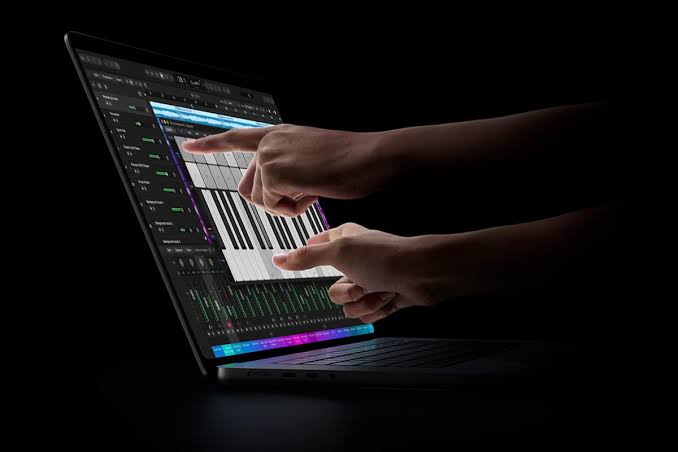
Let’s get the facts on the table first, because the name alone is a mouthful. The MacBook Pro with PROLED XDR Display comes in two sizes: a 14.2-inch model with a 3024 x 1968 resolution and a 16.3-inch model at 3472 x 2266. Both run on Apple’s M5 Pro or M5 Max chips, both ship with macOS 27, and they’re the first MacBooks ever to use an OLED screen.
That screen is a tandem OLED panel, which stacks two self-lit pixel layers on top of each other. Apple first used the same approach on the M4 iPad Pro in 2024, and the payoff is brightness that ordinary OLED struggles to reach. Apple quotes up to 2,000 nits of peak brightness for both HDR and SDR content, a 10,000,000:1 contrast ratio, a 120Hz ProMotion refresh rate and colour coverage across both P3 and Adobe RGB. Every panel is calibrated at the factory. Apple says brightness and greyscale stay even across the whole display, and that the internal reflections OLED usually suffers from are kept to a minimum.
The notch is gone too, and good riddance. In its place sits a Dynamic Island, borrowed straight from the iPhone. It houses a 12MP Center Stage camera, and on a touchscreen it becomes a little hub for music controls and live activities that you can actually tap. The bottom corners of the screen are now rounded to match the top. The illuminated Apple logo is back on the lid, which will please anyone who still misses the glowing apple of the early 2010s.
The chassis is thinner and lighter as well. The 14-inch model weighs 1.3kg, and the 16-inch comes in at 1.8kg, around half a pound lighter than before. There’s a six-speaker sound system that Apple says delivers 50% deeper bass, three Thunderbolt 5 ports, an SD card slot, HDMI, a headphone jack, MagSafe 3, Wi-Fi 7 and Bluetooth 6. Apple says battery life matches the standard M5 Pro and M5 Max MacBook Pro models.
The touchscreen is the least exciting thing about it
Here’s the slightly awkward truth for Apple’s marketing team: the headline feature isn’t the one that matters most.
Windows laptops have had touchscreens for well over a decade, and many of those are OLED. What makes this MacBook Pro special is the display itself. A 2,000-nit tandem OLED, calibrated panel by panel, is the kind of screen photographers, colourists and video editors usually buy a separate monitor to get. Apple’s hardware chief, Johny Srouji, called it the world’s best laptop display. We’d want to put a colorimeter on it before agreeing, but the spec sheet backs him up.
For creative professionals, that’s the real story: inky blacks next to blistering HDR highlights, and accurate colour out of the box. The touch layer is a pleasant bonus. The screen is the reason to buy.
How touch actually works on a Mac

Now for the bit everyone wants to know about. How do you use macOS with your fingers?
The short answer is: much as you’d expect, and that’s entirely deliberate. Apple hasn’t turned macOS 27 into a giant iPad interface, and it hasn’t blown every button up to thumb size. The keyboard and trackpad are still very much the main event. Touch is an extra option you can reach for when it makes sense.
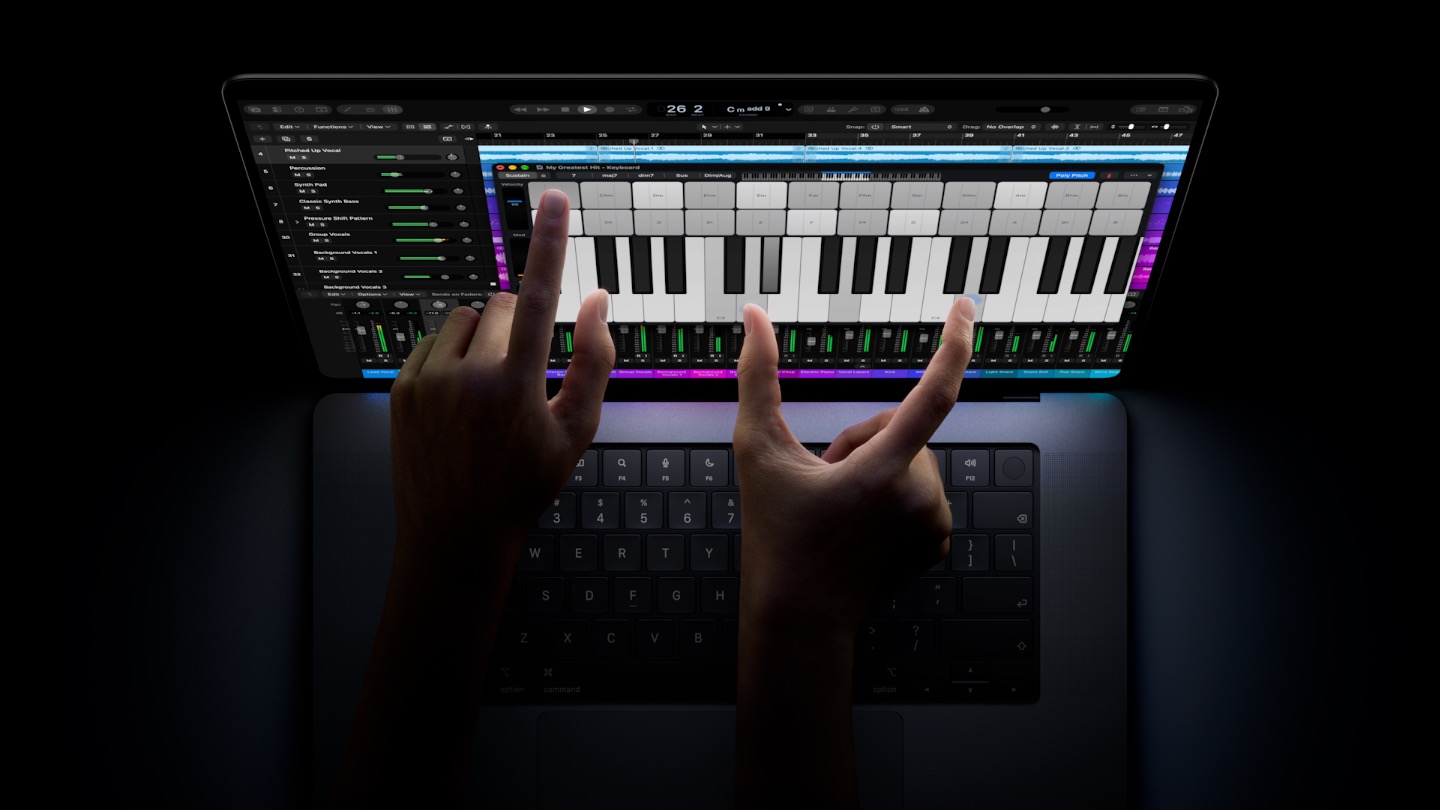
You can pinch to zoom into photos, drag files and windows around, double-tap to open images, and swipe with three fingers to jump between apps. Apple has also made some clever, quiet adjustments. When macOS detects a finger rather than a cursor, contextual menus spread their items out a little more so you don’t hit the wrong one. They go back to their usual size as soon as you return to the trackpad. Built-in apps such as Mail and Safari now have pull-to-refresh, a gesture that feels pointless on a trackpad and obvious on glass. The touch sensor is built into the OLED panel itself, not on a separate layer on top as it is on many Windows touchscreen laptops.
There are rough edges. The three window buttons in the top-left corner, the red, yellow and green dots Mac users have clicked for years, are tiny targets for a fingertip. Apple briefly enlarges them when you reach for them, but early impressions say the animation feels a touch slow. It’s a small thing, but you’ll run into it dozens of times a day. An Apple employee told reporters at the launch that the company is only getting started on tuning macOS for touch. We read that as a polite admission that version one isn’t finished.
How useful touch turns out to be will depend on third-party apps. Apple says Notion, Canva, Zoom, Microsoft Office and Adobe Lightroom are already on board, and it has published design guidance for developers. Think scrubbing through a timeline with a finger, nudging a slider in Lightroom, or playing an on-screen keyboard in a music app, which is exactly the kind of demo Apple leaned on. iPhone Mirroring benefits too, because now you can tap and swipe your phone’s screen the way you would if it were in your hand.
Why “normal” is the right call
Apple could easily have overdone this, with a 360-degree hinge, Pencil support and a macOS that looks like iPadOS with a menu bar. Plenty of fans have asked for exactly that for years.
Apple didn’t do it, and we think that’s correct. The MacBook Pro is a work machine. The people who buy it have years of muscle memory built around a keyboard and the best trackpad in the business. Throwing that out would have alienated the core audience to chase a hybrid crowd that already has an iPad Pro and a Magic Keyboard. Because macOS stays familiar and touch is something you only reach for now and then, Apple gets around the Jobs problem entirely. Your arm won’t get tired, because nothing forces you to hold your hand up to the screen. You’ll just tap it when that’s quicker than moving the cursor.
The best features are the ones you stop noticing. Within a week, we suspect most owners will be flicking through photos or tapping the Dynamic Island without thinking twice, then going straight back to the keyboard. That’s not a revolution. It’s better, because it fits how people actually work.
Now, about that price

This is where our enthusiasm cools.
In the UK, the 14-inch MacBook Pro with PROLED XDR Display starts at £2,899 with the M5 Pro chip. The 16-inch M5 Pro model starts at £3,399. With the M5 Max, you’re looking at £4,499 for the 14-inch and £4,799 for the 16-inch, and that’s before a single upgrade. Max out the 16-inch with the top memory and storage, and the US price hits $14,549, enough to buy a decent used car. Pre-orders are open now through Apple’s online store and the Apple Store app, with deliveries and in-store stock from Friday 6 November.
For context, Apple’s newly announced M6 MacBook Pro starts at $1,999 in the US. It keeps the familiar mini-LED Liquid Retina XDR display and has no touchscreen. The PROLED model starts at $2,899. That’s a $900 jump for a better screen, a Dynamic Island and touch, and it’s the highest starting price Apple has ever put on a MacBook Pro at launch.
There’s also a twist that will irritate spec-sheet purists. The most expensive MacBook Pro Apple has ever made runs an M5-generation chip, while the cheaper model announced a day earlier gets the newer M6. If you want the latest chip, you can’t have the OLED touchscreen. If you want the OLED touchscreen, you can’t have the latest chip. In practice, an M5 Pro or M5 Max is more than fast enough for almost anything you’ll throw at it. Still, paying a premium for last generation’s processor is going to sting for some buyers.
To be fair to Apple, touch isn’t really what you’re paying for. Tandem OLED panels are expensive to make, and calibrating each one individually adds up. But plenty of people will see the premium and assume they’re paying a fortune for fingerprints on their screen, and Apple has a real perception problem there.
What’s still missing
For a machine at this price, a few omissions stand out. There’s no Face ID, even though the Dynamic Island looks like the perfect home for it. There’s no cellular option either, so you’ll still be tethering to your phone on the train. And according to early hands-on reports, the display doesn’t support the Apple Pencil. That will disappoint illustrators who hoped one machine could replace both their Mac and their iPad.
None of these are deal-breakers. They’re the obvious upgrades for the next generation, though, and good reasons to wait if you hate buying version one of anything.
Who should buy it, and who shouldn’t
If you’re a photographer, video editor, colourist or designer who needs a reference-grade display on the go, this is the MacBook Pro to get. The screen alone justifies the jump, and touch will make some creative tasks faster and more fun. If you were already planning to spend over £3,000 on a 16-inch M5 Max machine, the extra cost of the PROLED version is easier to swallow.
If you mostly write, code, browse and join video calls, save your money. The M6 MacBook Pro will feel just as quick day to day, its mini-LED screen is still excellent, and you won’t miss touch as much as you think. And if what you really want is a tablet you can draw on, an iPad Pro, with its own tandem OLED display and Pencil support, is still the better tool.
Our verdict
Apple spent years insisting that a touchscreen Mac was a bad idea, and in a funny way, this launch shows it was half right. A Mac built around touch would have been a mess. A Mac that simply accepts touch when you want it, and doesn’t make a fuss about it, turns out to be a lovely idea.
The MacBook Pro with PROLED XDR Display isn’t exciting because you can tap the screen. It’s exciting because Apple has finally put a world-class OLED panel in its pro laptop. It has also killed the notch, cut the weight and added touch so smoothly that it feels like it was always meant to be there. The software still needs polish, the missing Face ID is baffling and the pricing is steep. But Apple has the basics right.
Our steer: creative pros who live by their screen should buy it now. Everyone else should get the M6 MacBook Pro, pocket the difference and let Apple spend another year smoothing out touch on the Mac.
MacBook Pro with PROLED XDR Display: the key facts
- UK price: from £2,899 (14-inch M5 Pro), £3,399 (16-inch M5 Pro), £4,499 (14-inch M5 Max), £4,799 (16-inch M5 Max)
- Availability: pre-order now, on sale Friday 6 November
- Display: 14.2-inch (3024 x 1968) or 16.3-inch (3472 x 2266) tandem OLED touchscreen, 120Hz ProMotion, up to 2,000 nits, 10,000,000:1 contrast
- Chips: Apple M5 Pro or M5 Max
- Weight: 1.3kg (14-inch), 1.8kg (16-inch)
- Camera: 12MP Center Stage, in the Dynamic Island
- Ports: 3x Thunderbolt 5, HDMI, SD card slot, headphone jack, MagSafe 3
- Connectivity: Wi-Fi 7, Bluetooth 6
- Software: macOS 27 with Apple Intelligence