


The Wait Is Over: Why the MacBook Neo Is the Laptop You’ve Been Dreaming Of
For years, walking into an Apple Store and looking at the MacBook lineup felt a bit like window shopping for a penthouse you’d never actually buy. You’d run your fingers over that cold, milled aluminum, marvel at the glowing logo, and then glance at the price tag. One thousand dollars? For a laptop? Ouch.
For the longest time, the narrative was clear: if you wanted the Mac experience: the seamless ecosystem, the build quality, the “it just works” magic: you had to pay the premium. If you were a student, a parent on a budget, or just someone who needed a reliable machine for everyday life without editing Hollywood blockbusters, Apple quietly suggested you go buy a plastic Windows laptop instead. Or maybe just stick with your iPad and squint at a tiny screen.
But the winds have changed. The gates have opened.
Meet the MacBook Neo.
This is Apple finally acknowledging that the world doesn’t consist entirely of video editors and software engineers. It’s a love letter to the rest of us. Priced at a genuinely accessible $599, the Neo is the machine that says, “You belong here.” And after spending a week living with it, we can tell you: the dream is real, and it’s better than you imagined.
The Design: Premium Isn’t Dead, It’s Just Affordable
The first thing that hits you when you unbox the Neo is the weight. Or rather, the lack of it. At just 1.23kg (2.7lbs), it feels impossibly light, slipping into a backpack so effortlessly you might forget it’s there. But don’t let the lightness fool you; this thing is built like a tank.
In a world where “budget” usually means “plastic creaking under pressure,” Apple has doubled down on aluminum. The chassis is a single, unified piece of metal that feels dense, cool to the touch, and undeniably premium. There is no flex in the deck, no give in the lid. It screams quality in a way that no sub-$600 PC we’ve tested in the last five years ever has.
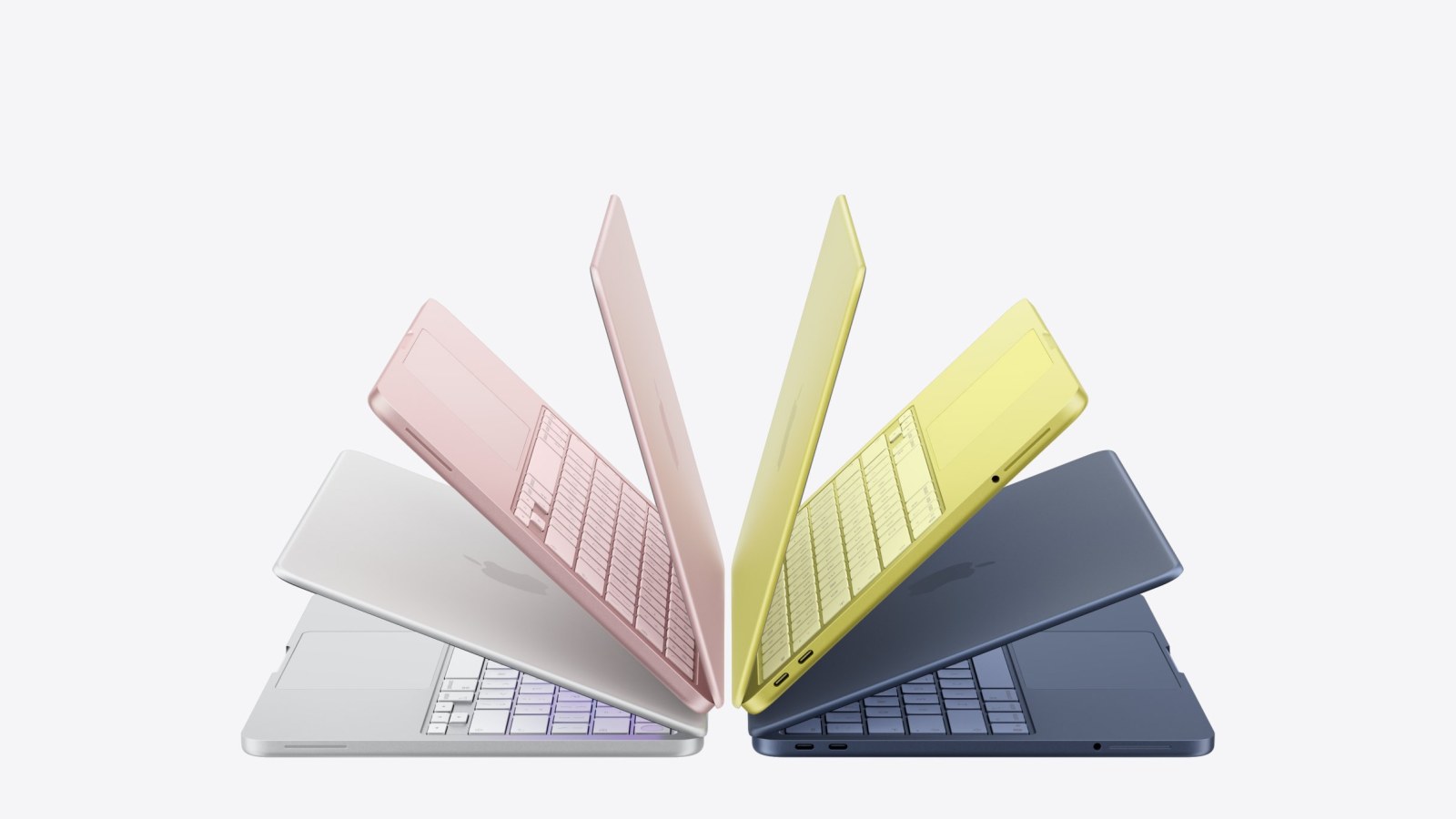
And then there are the colors. Forget the boring space gray and silver monopoly of the past. The Neo arrives in Blush, Indigo, and Citrus, alongside the classic Silver. We spent our review time with the Blush model, a soft, warm pinkish-beige that looks sophisticated rather than childish. The color isn’t just painted on; it’s anodized into the aluminum, giving it a depth that changes subtly depending on the light. Even the keyboard keys and the rubber feet on the bottom are color-matched to the chassis. It’s these tiny, obsessive details that make you feel like you bought a luxury item, not a compromise.
Is it perfect? Well, not quite. In a move that will surely frustrate night owls, Apple has omitted the backlit keyboard. On the Blush model, the keys are so light that visibility in dim rooms is surprisingly decent, but try typing on the Indigo or Citrus models in a dark coffee shop, and you’ll be hunting for keys. It’s a clear cost-cutting measure, and while it’s annoying, it’s hardly a dealbreaker when you consider the price tag. You can always plug in a small USB light or, you know, turn on a lamp.
The trackpad, however, is pure magic. It’s large, glass-smooth, and uses Apple’s signature force-feedback mechanism (haptic click) rather than a physical hinge. It feels identical to the trackpads on laptops costing twice as much. Once you get used to the glide, going back to a traditional plastic trackpad feels like trying to type on sandpaper.
The Screen: Bright, Bold, and Beautiful

Let’s talk about the display, because this is where you spend 100% of your time. The Neo sports a 13-inch Liquid Retina display with a resolution of 2408×1506 pixels. Is it the mini-LED XDR panel found on the Pro models? No. Does it have the wide P3 color gamut of the Air? Not quite; it sticks to the standard sRGB space.
But here is the secret: You probably won’t notice.
Unless you are a professional color grader or a print designer who needs pixel-perfect cyan accuracy, this screen is stunning. It pumps out 500 nits of brightness, which means you can use it outdoors on a sunny day without squinting. The contrast is sharp, the text is crisp, and the colors pop with that signature Apple vibrancy. Watching movies on this thing is a joy; the blacks are deep enough for late-night streaming, and the colors make everything from Netflix dramas to YouTube vlogs look incredible.
There’s no notch housing the camera, either. The bezels are slim but symmetrical, giving you a clean, uninterrupted view of your content. Speaking of the camera, it’s a 1080p FaceTime HD sensor tucked into the top bezel. It’s not the fancy 12MP CenterStage camera found on the pricier models, but in our tests, the image quality was excellent. You look sharp, well-lit, and professional on Zoom calls. For the student attending remote lectures or the freelancer hopping on client calls, it’s more than adequate.
Performance: The iPhone Powerhouse Inside Your Laptop

Here is where the story gets really interesting. For the first time ever, a MacBook is running an A-series chip; the same silicon that powers your iPhone. Specifically, the Neo is packing the A18 Pro.
Now, before the tech snobs start rolling their eyes: do not underestimate this chip. This is the same processor that runs the iPhone 16 Pro Max, a device that fits in your pocket. Putting it inside a laptop with active cooling (well, passive, but a larger thermal mass) unleashes its potential.
In everyday use, the Neo is blisteringly fast. Apps open instantly. Tabs in Chrome load before you’ve finished typing the URL. Switching between Spotify, Slack, and a dozen Safari tabs happens without a stutter. We pushed the machine hard, running Adobe Photoshop and Lightroom simultaneously while streaming music and downloading large files. Did it slow down? Barely.
The A18 Pro’s 6-core CPU and 5-core GPU handle general multitasking with an ease that makes the old Intel Macs look like they’re wading through molasses. But the real star here is the Neural Engine. With 16 cores dedicated to AI tasks, the Neo is future-proofed for the next generation of macOS features. On-device text summarization, smart photo organization, voice transcription, and generative AI tools run locally and instantly. This isn’t just a fast laptop; it’s a smart one.
Benchmark-wise, it trades blows with the M1 MacBook Air and comes shockingly close to the base M4 in single-core performance. Since most daily tasks (web browsing, document editing, email) rely heavily on single-core speed, the Neo feels just as snappy as machines costing hundreds more.
The Elephant in the Room: 8GB of Memory
We have to address the controversy. The base model comes with 8GB of unified memory, and there is no way to upgrade it later. In 2026, with many budget PCs shipping 16GB as standard, this feels stingy. Apple argues that their unified memory architecture is more efficient than traditional RAM, allowing 8GB to do the work of 16GB on other systems.
Is that marketing fluff? Partially. But also, kind of not.
In our testing, the 8GB limit didn’t rear its head until we really tried to break the machine. We kept ten heavy browser tabs open, plus Photoshop, Word, and Apple Music. The system remained responsive. However, if you are planning to edit 4K video, run virtual machines, or play high-end games, this is not your machine. The swap file usage kicks in, and you’ll see the spinning beach ball of death if you push too hard.
But remember who this is for. If you are the person who has dreamt of a Mac but couldn’t afford it, you are likely not rendering 3D animations. You are writing papers, managing spreadsheets, browsing social media, and streaming content. For that 90% of users, 8GB is plenty. It’s the sweet spot of affordability. If you need more, you’re already looking at the MacBook Air, and that’s okay. The Neo isn’t trying to replace the Pro; it’s trying to replace your old, sluggish Windows laptop.
Battery Life: The All-Day Companion
One area where the Neo absolutely shines is battery life. Apple claims up to 16 hours of video playback, and in our real-world testing, those numbers held up remarkably well.
We used the Neo for a full workday; writing, researching, video calls, and streaming; starting at 8 AM with a full charge. By 6 PM, we still had 25% left in the tank. That is genuine all-day battery life. You can leave the charger at home. You can take it to the library, the park, or a long flight without hunting for an outlet.
The efficiency of the A18 Pro chip combined with macOS optimization means this little laptop sips power. It’s liberating to use a computer without constantly glancing at the battery icon in panic.
Connectivity: What’s Missing (and What’s There)

To hit the $599 price point, some ports had to go. There is no MagSafe charging here; you charge via USB-C. There are two USB-C ports on the left side: one USB 3 (10Gb/s) and one USB 2. While both can charge the device, only the faster port supports external displays. We connected it to a 4K monitor, and while it worked perfectly, it defaulted to 1080p unless you tweak the settings. It’s a minor hassle, but worth noting if you are a multi-monitor user.
There is no HDMI port, so you’ll need a dongle for presentations. There is, however, a 3.5mm headphone jack, which is a delightful surprise in an era where everyone is forcing Bluetooth. Plug in your wired headphones or connect to external speakers without needing an adapter.
The lack of Thunderbolt 4 support is another cost-saving measure. You won’t be connecting high-speed external GPUs or ultra-fast RAID arrays. But again, for the target audience, a couple of USB-C ports for charging and a flash drive is usually enough.
The Verdict: Finally, A Mac for Everyone
The MacBook Neo is a revelation. It proves that you don’t need to spend a fortune to experience the best of Apple’s hardware and software integration. It looks gorgeous, feels incredibly solid, and performs with a zippiness that belies its budget price tag.
Yes, there are compromises. The 8GB memory ceiling is a hard wall. The lack of a backlit keyboard is an annoyance. The screen isn’t the absolute best Apple makes. But when you step back and look at the whole picture: a premium aluminum unibody, a stunning Retina display, an industry-leading chip, and all-day battery life for under $600; the compromises feel like minor footnotes in a very successful story.
For the student saving every penny, the parent buying a first computer for college, or the creative professional who just needs a reliable secondary machine, the Neo is not just an option. It is the option.
It’s the laptop you’ve been waiting for. The one you’ve looked at in store windows and sighed over. The barrier to entry has finally been lowered, and the view from inside the Apple ecosystem is just as beautiful as you hoped it would be.
Welcome to the family. You’re going to love it here.