



Google Maps just got a whole lot smarter; and you’ll wonder how you ever navigated without it
A Gemini-powered overhaul means Maps can now hold a proper conversation with you. The result is navigation that actually understands what you need ; not just where you’re going, but why.
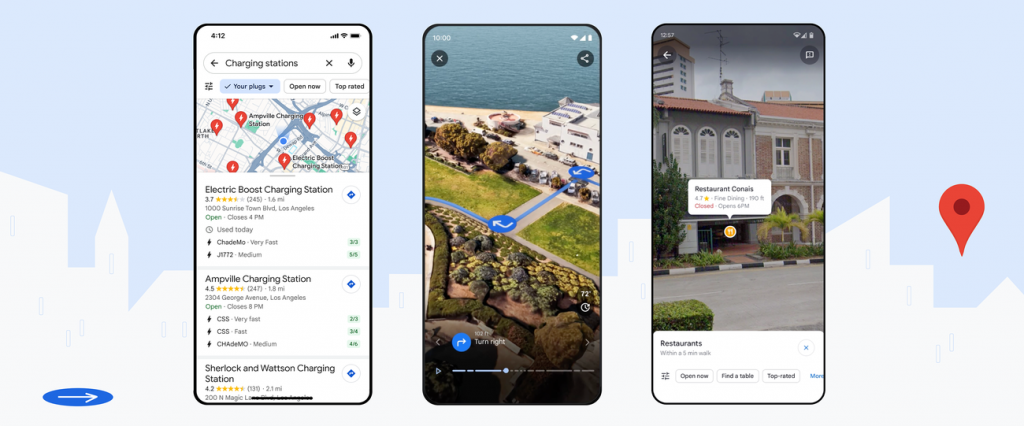
We’ve all been there. You’re running late, your phone is on 4%, and you desperately need somewhere to charge it… but you’d rather not be trapped next to a steaming milk frother for 45 minutes while you wait. Until now, Google Maps had no real answer for that. You’d type “coffee shop”, scroll through dozens of reviews, and hope for the best.
That’s about to change. Google has quietly rolled out one of the most genuinely useful updates Maps has ever seen, powered by its Gemini AI. And unlike a lot of AI features that feel like a solution looking for a problem, this one tackles the kind of messy, real-world questions that apps have always been terrible at handling.
Ask Maps: navigation that finally listens
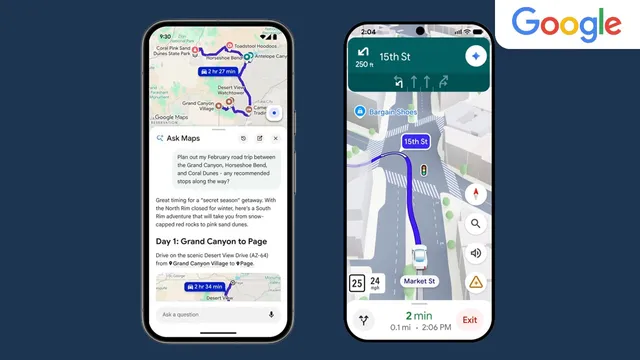
The centrepiece of the update is Ask Maps : a conversational mode that lets you type (or speak) questions exactly the way you’d actually ask them. Not “coffee shop W1”, but “where can I charge my phone without having to queue for a coffee?” Maps processes your query against data from over 300 million places and reviews from more than 500 million contributors, then comes back with a curated shortlist alongside a custom map showing your options at a glance.
The clever part is in how it interprets the question. Rather than pattern-matching keywords and returning a category listing, it reasons about what you actually need; factoring in intent, context and constraints all at once. It’s a small shift in interaction design, but in practice it feels like the difference between talking to a search engine and talking to a well-travelled friend who actually knows the area.
The smarter trick, though, is in how Ask Maps personalises its suggestions. It draws on your previous Maps searches to understand your preferences: so if you’re vegan, or you always gravitate towards independent cafés over chains, those habits will quietly shape what it recommends without you needing to spell them out every time.
Planning a road trip? Ask about stops along the way and it’ll tailor options to your tastes specifically, rather than serving up the same motorway services it would suggest to everyone else. Tell Maps you’re meeting friends for dinner and it won’t just point you towards a restaurant — it’ll factor in your dietary requirements and even help you make a reservation directly from the app. Less friction, fewer tabs, less faff.
Immersive Navigation: driving in glorious detail
The second major addition is Immersive Navigation; and if Ask Maps is about making Maps smarter, this one is about making it more useful in the moment you need it most: when you’re actually driving.
The current Maps driving view is functional but fairly flat. It tells you where to turn, but it doesn’t always match what you’re seeing out of the windscreen; particularly in complex urban environments where a simple line on a map can leave you second-guessing which lane you should be in.
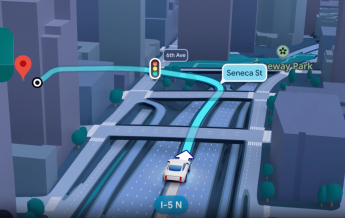
Immersive Navigation addresses that directly. You’ll now see buildings, overpasses, terrain, lane markings, pedestrian crossings and traffic lights rendered in rich 3D detail. Gemini has been used to analyse existing Street View photography and reconstruct it into a navigable three-dimensional layer — a genuinely impressive bit of engineering that most of us will take entirely for granted within about three days of using it.
The feature works across iOS, Android, CarPlay, Android Auto and cars with Google built-in, so wherever you currently use Maps for turn-by-turn directions, the upgrade should appear automatically.
When will it reach the UK?
Both features are currently rolling out in the US, with Ask Maps also live in India on Android and iOS. Desktop support for Ask Maps is coming soon. Google hasn’t confirmed a timeline for a wider international rollout: frustrating news for anyone outside those markets who’s read this far.
That said, given how central Maps is to daily life for most smartphone users, and how much Google has invested in Gemini as a platform-wide upgrade, it’s hard to imagine these features staying US-only for long. It’s more a question of when, not if.
In the meantime, keep your Maps app updated; both features are rolling out gradually, and automatic updates are the best way to make sure you get them as soon as they land in your region. You can check out Google Maps at maps.google.com.